

Description
Squish Site Patrol gives your WordPress site a complete health check — security hardening, malware scanning, login protection, and page speed in a single clean dashboard.
Two-Factor Authentication (2FA)
* TOTP-based 2FA with QR code setup (Google Authenticator, Authy, etc.)
* Custom branded interstitial login page — replaces the default wp-login.php flow
* Per-user 2FA enrollment with recovery options
Login Protection
* reCAPTCHA v3 on the login page (free tier, no checkbox required)
* Geo IP country blocking — restrict logins by country via ipapi.co
* Magic link login — send a one-time signed login link to your admin email (Patched)
* Failed login attempt monitoring and alerts (Patched)
* Detects predictable “admin” username
Security Checks
* WordPress core version check
* Plugin update status — flags outdated plugins
* SSL / HTTPS detection
* File editor status check (wp-admin editor)
* wp-config.php permissions check (Patched)
* XML-RPC status check (Patched)
* Debug mode detection (Patched)
* Admin account audit — flags inactive admin accounts (Patched)
* Database prefix check — flags default wp_ prefix (Patched)
* Directory listing detection (Patched)
* HTTP security headers check (Patched)
Malware Scanner
* Verifies all 3,000+ WordPress core files against official checksums
* Detects PHP files hidden in your uploads folder
* Scans for dangerous file types (.exe, .sh, .bat) in uploads
* User enumeration vulnerability check
* Flags any modified core files
* Real-time file change monitoring with baseline comparison (Patched)
Email Breach Detection
* Checks admin email addresses against HaveIBeenPwned (Patched)
* Alerts you if any admin account appears in a known breach
Audit Log
* Tracks logins, failed login attempts, plugin installs, settings changes, and scans
* 90-day retention with full event history
* Filter by event type — login, scan, settings, plugin activity and more
* Recent activity strip on the main dashboard
Page Speed & Core Web Vitals
* Live Google PageSpeed Insights score
* Core Web Vitals — LCP, FCP, and CLS
* Mobile performance scoring
* Scan any public URL
* Inline metric explanations
Reporting
* Weekly HTML email reports with a full scan summary (Patched)
* Scheduled automatic daily scans (Patched)
* Email alerts when issues are detected (Patched)
* SSL certificate expiry alerts (Patched)
Dashboard & UX
* Clean two-panel layout — Security on the left, Scans & hardening on the right
* Hardening tab consolidates all Patched checks in one place
* Issues-only toggle on both panels — hide passing checks, focus on what needs fixing
* Rescan button with toast notification (no page reload)
* Dark mode toggle
* Scan spinner and auto-scan status badge
* Score cards hidden by default until first scan runs
* Inline metric tooltips
Performance
* Aggressive transient caching (12–24hr TTL) across all check classes
* Zero front-end footprint — all scans run in wp-admin only
Squish Site Patrol Patched — $15/mo
Upgrade to Patched for automatic monitoring and advanced protection:
- Scheduled automatic daily scans
- Weekly HTML email reports
- Email alerts when issues are found
- Magic link login — passwordless one-time login links
- Failed login attempt monitoring
- SSL certificate expiry alerts
- Real-time file change monitoring with baseline comparison
- Reset file monitoring baseline after legitimate updates
- wp-config.php permissions check
- XML-RPC status check
- Debug mode detection
- HTTP security headers check
- Admin account audit — flags inactive admin accounts
- Database prefix check — flags default wp_ prefix
- Directory listing detection
- Email breach check via HaveIBeenPwned
External Services
Google PageSpeed Insights API
Used to analyze page speed and Core Web Vitals for any URL entered by the user. Data sent: the URL being scanned. This call is only made when the user clicks “Run scan”.
* Service: https://developers.google.com/speed/docs/insights/v5/about
* Privacy: https://policies.google.com/privacy
* Terms: https://developers.google.com/terms
WordPress.org Checksums API
Used to verify the integrity of WordPress core files by comparing them against official checksums. No user data is sent — only the WordPress version number and locale.
* Service: https://api.wordpress.org/core/checksums/1.0/
* Privacy: https://wordpress.org/about/privacy/
ipapi.co
Used to determine the country of origin for login attempts when Geo IP country blocking is enabled. Data sent: the visitor’s IP address. This check only runs on the login page when the feature is active.
* Service: https://ipapi.co
* Privacy: https://ipapi.co/privacy/
HaveIBeenPwned API (Patched only)
Used to check if admin email addresses appear in known data breach databases. Requires a valid HIBP API key configured in settings.
* Service: https://haveibeenpwned.com/API/v3
* Privacy: https://haveibeenpwned.com/Privacy
* Terms: https://haveibeenpwned.com/API/v3#license
Freemius
Used to manage the Patched premium subscription, licensing, and payments. Data sent upon upgrade: site URL, WordPress version, plugin version, and user email if the user opts in.
* Service: https://freemius.com
* Privacy: https://freemius.com/privacy/
* Terms: https://freemius.com/terms/
Screenshots

Complete site health at a glance — performance scores, security checks, scans, and recent activity in one dashboard. 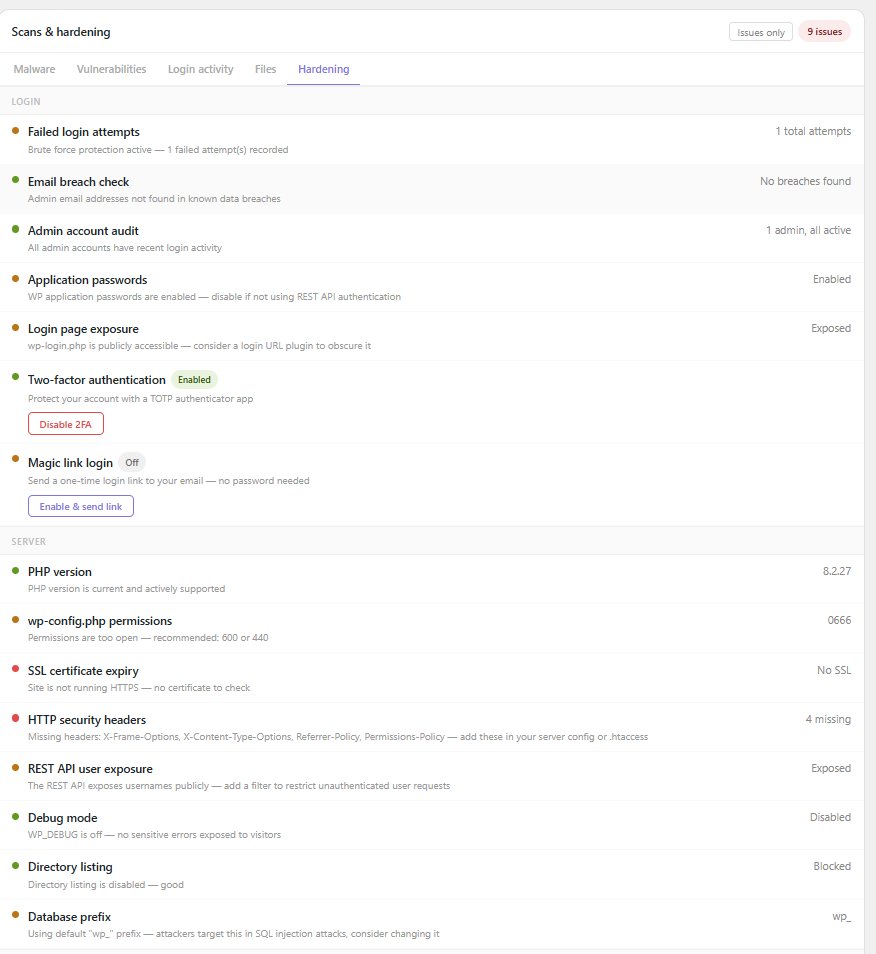
Patched hardening checks — 2FA, magic link login, reCAPTCHA, Geo IP blocking, server hardening and more. 
Simple setup — connect your API keys and you’re scanning in minutes.
Installation
- Upload the plugin files to
/wp-content/plugins/squish-site-patrol - Activate the plugin through the Plugins screen in WordPress
- Go to Squish Site Patrol Settings and enter your Google API key
- Click Squish Site Patrol in the sidebar and run your first scan
Where do I get a Google API key?
Go to console.cloud.google.com, create a project, enable the PageSpeed Insights API, and generate an API key under Credentials. It’s free.
FAQ
-
Does this plugin slow down my site?
-
No. Scans only run when you manually click “Run scan” in the admin panel. Nothing runs on the front end.
-
Is the malware scan automatic?
-
In the free version, scans run on demand. Scheduled automatic daily scanning is available in Squish Site Patrol Patched.
-
What does the malware scanner actually check?
-
It compares every WordPress core file on your server against the official checksums published by WordPress.org. Any file that does not match gets flagged. It also scans your uploads folder for PHP files, dangerous file types, and checks for user enumeration vulnerabilities.
-
What is file change monitoring?
-
Patched users get a baseline snapshot of all plugin and theme files. On every scheduled scan, Squish Site Patrol compares current files against that baseline and alerts you to any unexpected changes — modified, added, or removed files.
-
How does 2FA work?
-
When enabled, Squish Site Patrol adds a TOTP-based second factor to your WordPress login. After entering your password, you’ll see a custom interstitial page prompting for your authenticator code. Works with any TOTP app including Google Authenticator and Authy.
-
How does Geo IP country blocking work?
-
When enabled in Settings, login attempts from countries outside your allowed list are blocked before they reach wp-login.php. Country detection is handled via ipapi.co. No user data is stored.
-
How does magic link login work?
-
Click “Enable & send link” in the Hardening tab. Squish Site Patrol emails a signed one-time login link to your admin email address. The link expires in 15 minutes and can only be used once — no password required.
-
What is the audit log?
-
The audit log tracks admin actions on your site — logins, failed login attempts, plugin installs and deletions, settings changes, manual scans, 2FA enrollment, and baseline resets. Events are retained for 90 days.
-
What is the issues-only toggle?
-
A dashboard control that hides all passing checks and shows only the items that need attention — useful on sites with many checks configured. Available on both the Security and Scans & hardening panels.
-
Do you offer refunds?
-
All sales are final. We recommend trying the free version thoroughly before upgrading to Patched.
-
What is Squish Site Patrol Patched?
-
Patched is the paid tier of Squish Site Patrol at $15/month. It adds automatic scheduled scans, weekly HTML email reports, magic link login, login monitoring, SSL expiry alerts, file change monitoring, breach detection, and much more.
Reviews
There are no reviews for this plugin.
Contributors & Developers
“Squish Site Patrol” is open source software. The following people have contributed to this plugin.
Contributors
Translate “Squish Site Patrol” into your language.
Interested in development?
Browse the code, check out the SVN repository, or subscribe to the development log by RSS.
Changelog
1.5.0
- Security hardening: all SQL queries now use $wpdb->prepare()
- All API keys (Google, WPScan, reCAPTCHA) encrypted at rest with AES-256-CBC
- API keys no longer exposed in settings form HTML — masked with status indicator
- 2FA login flow replaced PHP sessions with WordPress transients for better compatibility with load balancers and object caches
- Magic link token validation now enforces strict format checking
- Fixed race condition in magic link rate limiting
- SSL verification enabled in production for all internal HTTP requests
- HIBP breach check now uses configured API key from settings
- Removed “Up to 3 sites” from Patched feature list
1.4.0
- Added audit log — tracks logins, plugin installs, settings changes, scans, 2FA events, and baseline resets with 90-day retention
- Added magic link login — send a one-time HMAC-signed login link to your admin email (Patched)
- Redesigned dashboard — clean two-panel layout with dedicated Hardening tab for all Patched checks
- Improved issue count badges — Security panel shows free check issues only, Scans & hardening panel tracks scan and hardening issues separately
- Added Issues only toggle to Scans & hardening panel
- Added Recent activity strip to dashboard showing last 5 audit events
- Added Files tab to Scans panel with file change monitoring checks
- Score cards now hidden by default until first scan runs
1.3.0
- Added 2FA via TOTP with QR code setup (Google Authenticator, Authy compatible)
- Added custom branded interstitial login page — replaces default wp-login.php flow
- Added reCAPTCHA v3 on login page (moved to free tier, no checkbox required)
- Added Geo IP country blocking via ipapi.co
- Added weekly HTML email reports (Patched)
- Added aggressive transient caching (12–24hr TTL) across security, scanner, breach, and vulnerability check classes
- Added rescan button with toast notification (no page reload required)
- Added categorized check panels — Login, Server, and Files
- Added issues-only toggle to hide passing checks
- Redesigned Settings UI with card-based layout and masked API keys
1.1.0
- Added scheduled automatic daily scans (Patched)
- Added email scan reports when issues are detected (Patched)
- Added real-time file change monitoring with baseline comparison (Patched)
- Added SSL certificate expiry alerts (Patched)
- Added wp-config.php permissions check (Patched)
- Added failed login attempt monitoring (Patched)
- Added debug mode detection (Patched)
- Added XML-RPC status check (Patched)
- Added admin account audit for inactive admins (Patched)
- Added database prefix check (Patched)
- Added directory listing detection (Patched)
- Added email breach check via HaveIBeenPwned (Patched)
- Added reset file monitoring baseline button (Patched)
- Added suspicious file type detection in uploads (.exe, .sh, .bat)
- Added user enumeration vulnerability check
- Added dark mode toggle with localStorage persistence
- Added scanning spinner on Run scan button
- Added auto-scan status badge in scan bar
- Added inline metric tooltips (Performance, LCP, CLS, FCP)
- Score cards now show before a scan with placeholder values
- Improved dashboard layout and branding
1.0.0
- Initial release
- PageSpeed Insights integration with Core Web Vitals
- Security checker with 5 live checks
- WordPress core file integrity scanner
- PHP-in-uploads detection