

Description
It automatically detects the post type where it is implemented and provide the endless navigation from the same taxonomy/category. You don’t need to worry about its order. It automatically manages alphabetical order for next and previous navigation.
When the visitor reaches the last item, “next” takes him back to the first one (and the other way round), that is why it is endless.
- Author: Fahad Mahmood
- Project URI: http://androidbubble.com/blog/wordpress/plugins/endless-posts-navigation
- License: GPLv2 or later. The bundled PHP QR Code library is licensed under LGPL 3.
Ways to add the navigation
- Template functions:
epn_prev_post_link(true)andepn_next_post_link(true)in single.php, page.php or any custom post type template. - Shortcodes (for block themes, page builders and widgets):
[epn_nav]for both links, or[epn_prev]and[epn_next]separately. Optional attributes:text="Older"andwithin_cat="no". - A
the_contentfilter, see the plugin settings page for a ready to use snippet.
Settings
Previous / next texts, post titles instead of “previous” and “next”, and the sort order (post title or menu order).
Developers
epn_navigation_taxonomiesfilter: taxonomies used for the “same category” condition. Posts use categories, any other post type uses its public hierarchical taxonomies. Return an empty array to navigate within the whole post type.epn_navigation_query_argsfilter: arguments of the query which collects the posts to loop through.epn_link_htmlfilter: final HTML of a previous/next link.
Mobile app
The settings can also be managed with the Endless Posts Navigation Android app. Open the QR code on the settings page and scan it with the app. The QR code works once and expires in two minutes, paired sessions can be disconnected from the settings page at any time.
Detailed description.
Important!
Visit my blog and suggest good features which you want to see in this plugin.
Tags
pagination, filtering, alphabet sequence, sorting next previous posts, sorting pages
Video Tutorials:
Endless Post Navigation – Normal:
Endless Post Navigation – Leakage:
License
This WordPress Plugin is free software: you can redistribute it and/or modify
it under the terms of the GNU General Public License as published by
the Free Software Foundation, either version 2 of the License, or
any later version.
This free software is distributed in the hope that it will be useful,
but WITHOUT ANY WARRANTY; without even the implied warranty of
MERCHANTABILITY or FITNESS FOR A PARTICULAR PURPOSE. See the
GNU General Public License for more details.
You should have received a copy of the GNU General Public License
along with this software. If not, see http://www.gnu.org/licenses/gpl-2.0.html.
Screenshots



Installation
To use Endless Posts Navigation, you will need: * an installed and configured copy of [WordPress][] (version 4.7 or later). * FTP, SFTP or shell access to your web host
New Installations
Method-A: 1. Go to your wordpress admin “yoursite.com/wp-admin” 2. Login and then access “yoursite.com/wp-admin/plugin-install.php?tab=upload 3. Upload and activate this plugin 4. Now go to admin menu -> settings -> Endless Posts Navigation
Method-B:
1. Download the Endless Posts Navigation installation package and extract the files on your computer.
2. Create a new directory named endless-posts-navigation in the wp-content/plugins directory of your WordPress installation. Use an FTP or SFTP client to upload the contents of your Endless Posts Navigation archive to the new directory
that you just created on your web host.
3. Log in to the WordPress Dashboard and activate the Endless Posts Navigation plugin.
4. Once the plugin is activated, a new Endless Posts Navigation sub-menu will appear in your WordPress admin -> settings menu.
FAQ
-
Is this compatible with all WordPress themes?
-
Yes, it is compatible with all WordPress themes which are developed according to the WordPress theme development standards.
-
There are three methods. You can paste the template functions (with or without custom HTML) in your theme files, use the
the_contentfilter snippet, or use the shortcodes[epn_nav],[epn_prev]and[epn_next]. The code of each method is available on the settings page. -
Where the shortcode should be pasted?
-
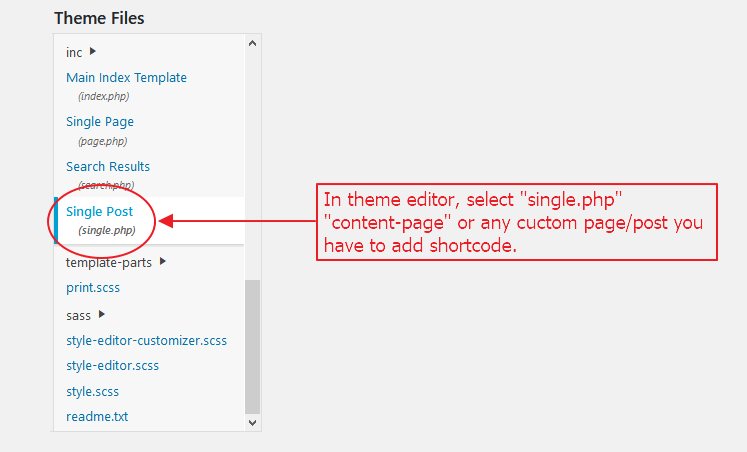
In the post/page content, in a Shortcode block or in a text widget, the shortcodes are the easiest way to use the plugin with block themes. The template functions are pasted in your theme template files, for example single.php, page.php, index.php, archive.php or where your are need this navigation.
-
Does it work with custom post types and custom taxonomies?
-
Yes. Posts navigate within the same categories. Other post types navigate within the terms of their public hierarchical taxonomies, and within the whole post type when it has none (pages for example). Use the
epn_navigation_taxonomiesfilter to choose the taxonomies yourself or to disable the condition. -
Why is there no link on some posts?
-
The link is not shown when there is no other published item in the same category/taxonomy terms to navigate to.
-
I paired the mobile app before, do I have to do it again?
-
Yes. Version 2.4.0 replaces the old pairing with a secure one. Scan the QR code on the settings page once more.
Reviews


Contributors & Developers
“Endless Posts Navigation” is open source software. The following people have contributed to this plugin.
Contributors

Translate “Endless Posts Navigation” into your language.
Interested in development?
Browse the code, check out the SVN repository, or subscribe to the development log by RSS.
Changelog
2.4.0
- Security: any logged in user (a subscriber for example) could print the data of any post through a leftover debug parameter, and could generate mobile app QR codes. The debug code is removed and the QR code generation now requires an administrator and a nonce.
- Security: the mobile app pairing is rebuilt. The QR secret is random, stored hashed, works once and expires in two minutes. The app exchanges it for a random login key (stored hashed) which the settings routes require. Pairing is rate limited, and a “Disconnect all sessions” button was added. Please pair the app again after updating.
- Security: every output of the navigation links, settings page and QR modal is escaped, and the settings are sanitized with a whitelist.
- Fix: apostrophes in the previous/next texts got a backslash on every save.
- Fix: warnings when there was no post to navigate to, and a link pointing to the current post when it was the only one.
- Fix: PHP 8.1+ deprecation notices in the bundled QR code library.
- Fix: the QR code url now works without pretty permalinks.
- Feature: shortcodes [epn_nav], [epn_prev] and [epn_next] for block themes, page builders and widgets.
- Feature: custom post types navigate within their own hierarchical taxonomies, as the description always promised. See the FAQ and the
epn_navigation_taxonomiesfilter. - Improvement: the QR code is drawn as an inline SVG, nothing is written to the plugin folder anymore.
- Improvement: performance. Only the IDs are queried, the result is reused within the request, the scripts and styles load only where they are needed, and the plugin list is no longer read on every request.
- Improvement: the bundled French, German and Spanish translations are loaded now, a .pot file is included and the new texts are translated.
- Improvement: the plugin removes its options when it is deleted.
- Improvement: the same sort order is guaranteed for posts with an identical title/menu order.
- Developers: filters
epn_navigation_taxonomies,epn_navigation_query_argsandepn_link_html. - Tested up to WordPress 7.0.
2.3.0
- Fix: Broken Access Control vulnerability in “api_update_settings” REST API endpoint. Unauthenticated users can no longer update plugin settings without proper nonce and capability checks. [Thanks to Legion Hunter / Patchstack][05/02/2026]
- Improvement: Updated QR code generation to use cryptographically secure random hash.
- Improvement: Removed insecure hardcoded login_key check and enforced proper nonce verification.
- Enhancement: Admin QR code modal now returns JSON response for AJAX instead of echoing HTML directly.
2.2.8
- Fix: Option data escaped but still lack of nonce check to prevent CSRF. [Thanks to SOPROBRO | Darius Sveikauskas / Patchstack][22/10/2024]
2.2.7
- Fix: Reported Cross Site Request Forgery (CSRF) vulnerability. [Thanks to SOPROBRO | Darius Sveikauskas / Patchstack][17/10/2024]
2.2.6
- Sort order related improvements made. [Thanks to Developers Web / @user-ki8wk9qf9y][29/01/2024]
2.2.5
- Updated for WordPress version. [24/05/2023]
2.2.4
- Updated version for WordPress. [07/09/2022]
2.2.3
- Loop being within same category made optional. [Thanks to Dmitrii Shchelko][14/04/2022]
2.2.2
- Added another implementation method through functions.php [Thanks to donthelosr][20/01/2022]
2.2.1
- Updating for WordPress version.
2.2.0
- Cannot declare class qrstr, because the name is already in use. Fixed. [Thanks to Rais Sufyan]
2.1.9
- Android App introduced with lighter web version. [Thanks to Team Ibulb.Work]
2.1.8
2.1.7
- Android App introduced. [Thanks to Team Ibulb.Work]
2.1.6
- Languages revised. [Thanks to Rais Sufyan]
2.1.5
- Languages added. [Thanks to Abu Usman]
2.1.4
- Revised a few layout items.
2.1.3
- Sanitized input and fixed direct file access issues.
2.1.2
- Plugin is translatable.
2.1.1
- Within category fix.
2.1.0
- Post titles can be displayed instead of next and previous.
2.0
- Front-end styles added.
1.1
- Layout fixes.