
Description
Factorial2000 Catalog Sync connects a WooCommerce store to the product feeds of its suppliers and to marketplaces. It is built for Ukrainian online stores, dropshippers and sellers who work with Prom.ua and YML/XML price lists. The admin screens and the built-in documentation are in Ukrainian.
Українською: Factorial2000 Catalog Sync — плагін для WooCommerce: імпорт товарів з Prom.ua (XML/YML) та прайсів постачальників, автоматичне оновлення цін і залишків за розкладом, націнка, звіти в Telegram. У Pro — фід для Prom.ua, кілька постачальників і оновлення від кожних 5 хвилин. Безкоштовно назавжди, Pro можна спробувати 14 днів без картки.
It does three jobs:
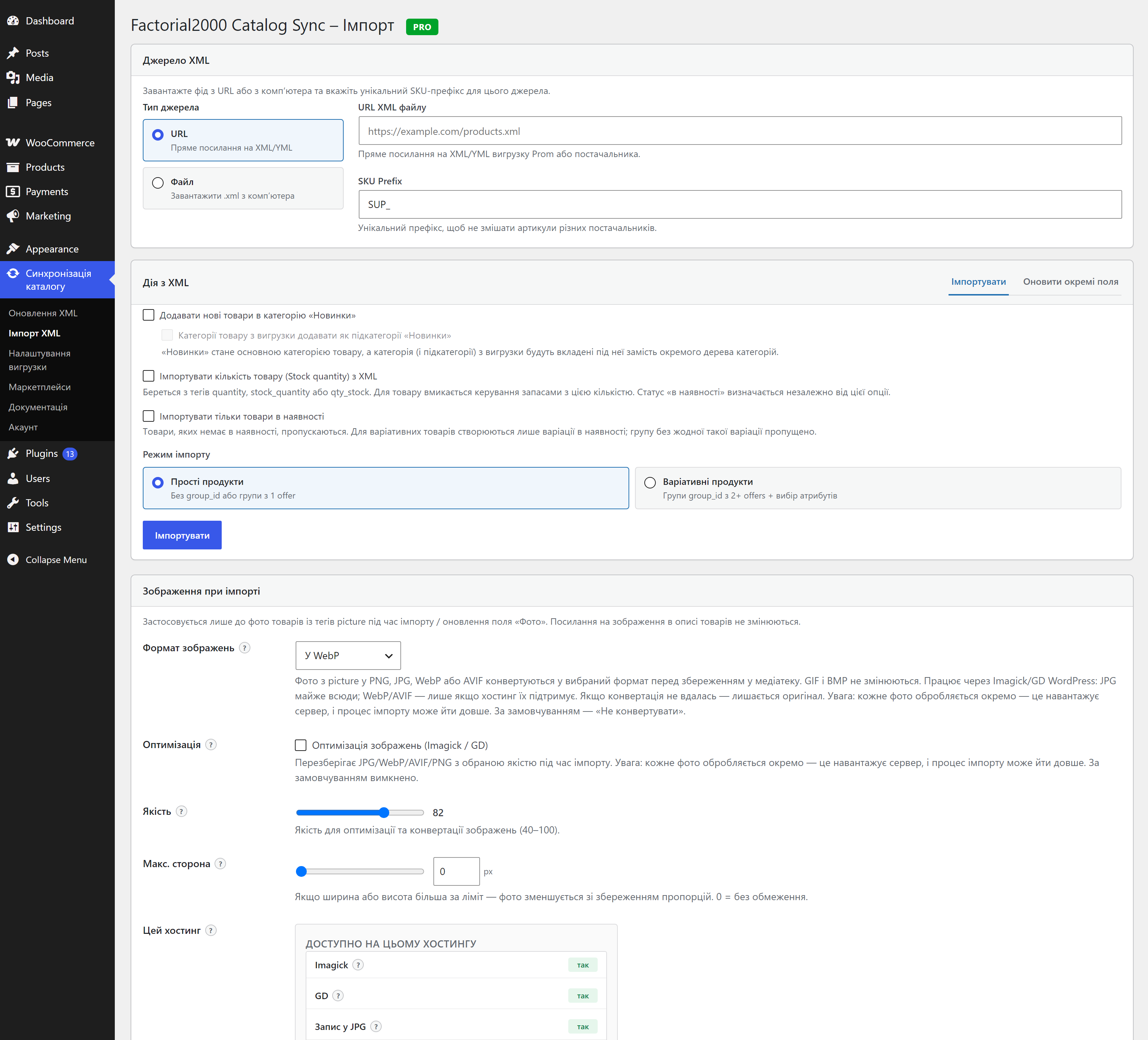
- Import products from a supplier feed. Give it an XML/YML link (a Prom.ua export, a supplier price list, OneBox and similar) and it creates WooCommerce products: simple and variable products with names, descriptions, pictures, attributes, categories, weight, barcode and dimensions.
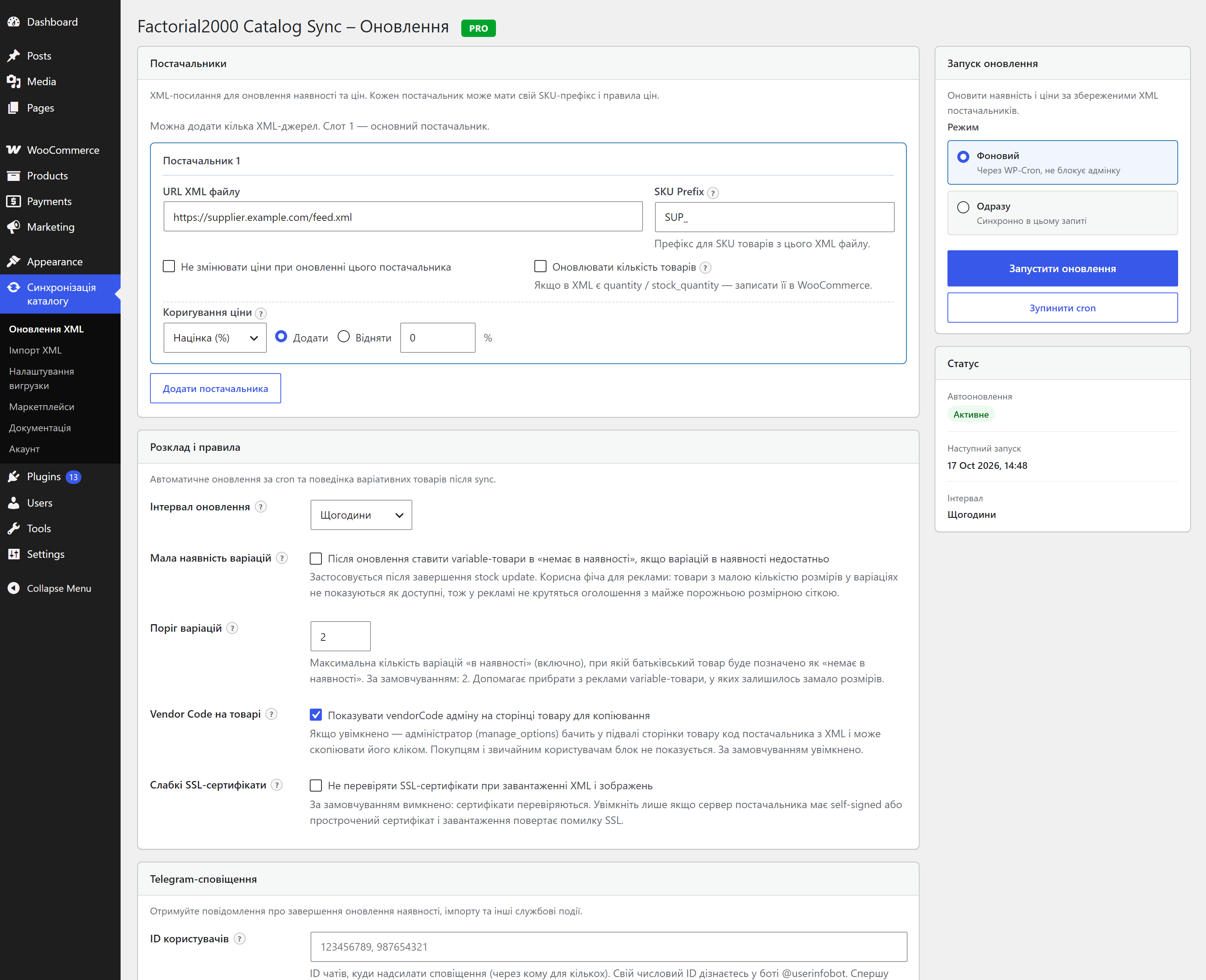
- Keep stock and prices in sync. A scheduled job (WP-Cron) reads the feed again and updates availability and prices, so the shop does not sell what the supplier no longer has. A Telegram report tells you what changed.
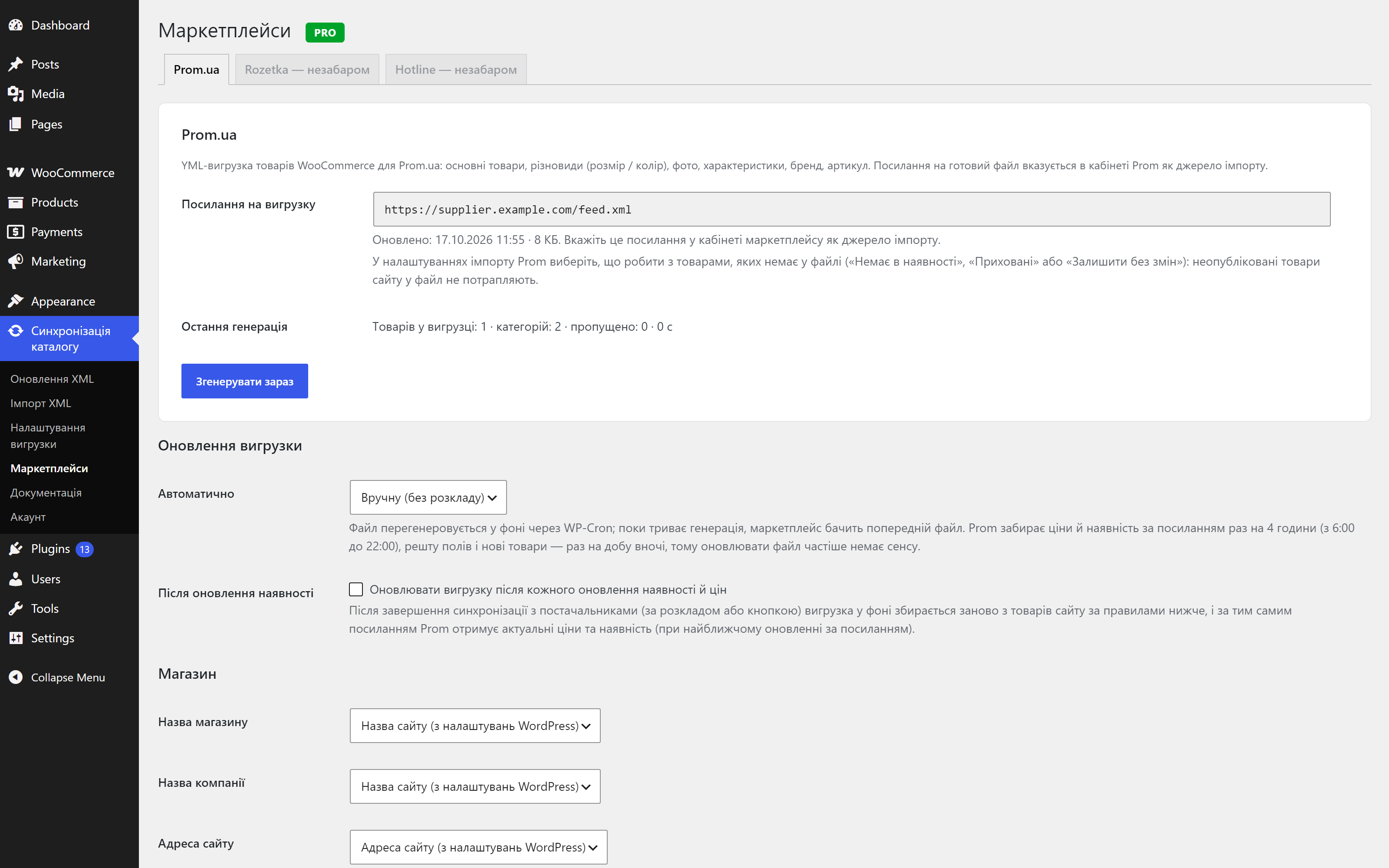
- Publish your catalog to a marketplace (Pro). Today that is Prom.ua: the plugin builds a Prom-compatible YML feed from your WooCommerce products at a permanent private link, and Prom imports it from that link. The Marketplaces page is built so that other marketplaces (for example Rozetka and Hotline) can be added later; they are planned and are not available yet.
What you get for free
Everything below is in the plugin you download from WordPress.org, with no time limit:
- Import simple and variable products from XML/YML (
<offer>,group_id,<param>,<picture>, categories, weight, barcode, dimensions) - Option to import only products that are in stock
- Automatic stock status and price updates for one supplier, once a day, plus 3 manual runs a day
- SKU prefix per supplier, so the plugin only touches its own products
- Price adjustment per supplier: markup, margin or a fixed amount
- Currency conversion from the feed’s
<currencies>/currencyId - Products that disappear from the supplier feed are drafted (variations are set out of stock); they come back when the supplier lists them again. A broken or empty feed is never trusted: it sets that supplier’s products out of stock instead of publishing wrong data
- Telegram notifications with import and sync reports
- Built-in documentation, clean uninstall
What Pro adds
Pro is a separate build of the same plugin that you install from your Freemius account. It does not unlock anything inside the plugin from WordPress.org; the Pro code is simply not part of it.
- Marketplaces: Prom.ua feed. Publishes your WooCommerce products to Prom.ua as a YML feed at a permanent link. Simple and variable products, brands, pictures and Prom categories are supported, and catalogs of 10,000+ offers are built in the background. Rebuild on a schedule, from the command line (
wp f2000cs marketplace build prom), or right after every stock sync, so Prom always gets current prices and stock - Prom categories picked by name. The Prom category list is built in: search it in a Select2 field when you map your store categories, set a default category, or choose a category for one product
- A report on what was left out and why (no price, no picture, no category, duplicate variations), with example SKUs; protection against publishing a feed that suddenly shrank
- Several suppliers with their own XML links, SKU prefixes and settings
- Stock quantity updates and more frequent syncs: every 5, 10, 15 or 30 minutes, hourly, or several times a day, without the manual-run limit
- XML editor and export filter: build a custom Prom.ua export by category or product, with price and stock filters
- Fields updater: update chosen fields (name, description, pictures, attributes, categories, tags, vendor code) on products that are already imported
- Image processing: convert and resize pictures to WebP, AVIF or JPG on import
You can start a 14-day Pro trial without a credit card from the plugin (Freemius account). When the trial ends, the Free features keep working.
Who it is for
- Stores that take their catalog from one or several suppliers and want stock and prices to update by themselves
- Sellers who list the same WooCommerce products on Prom.ua and need a clean, correct feed instead of maintaining Prom by hand
- Agencies that set up product synchronization for several shops
How it works in short
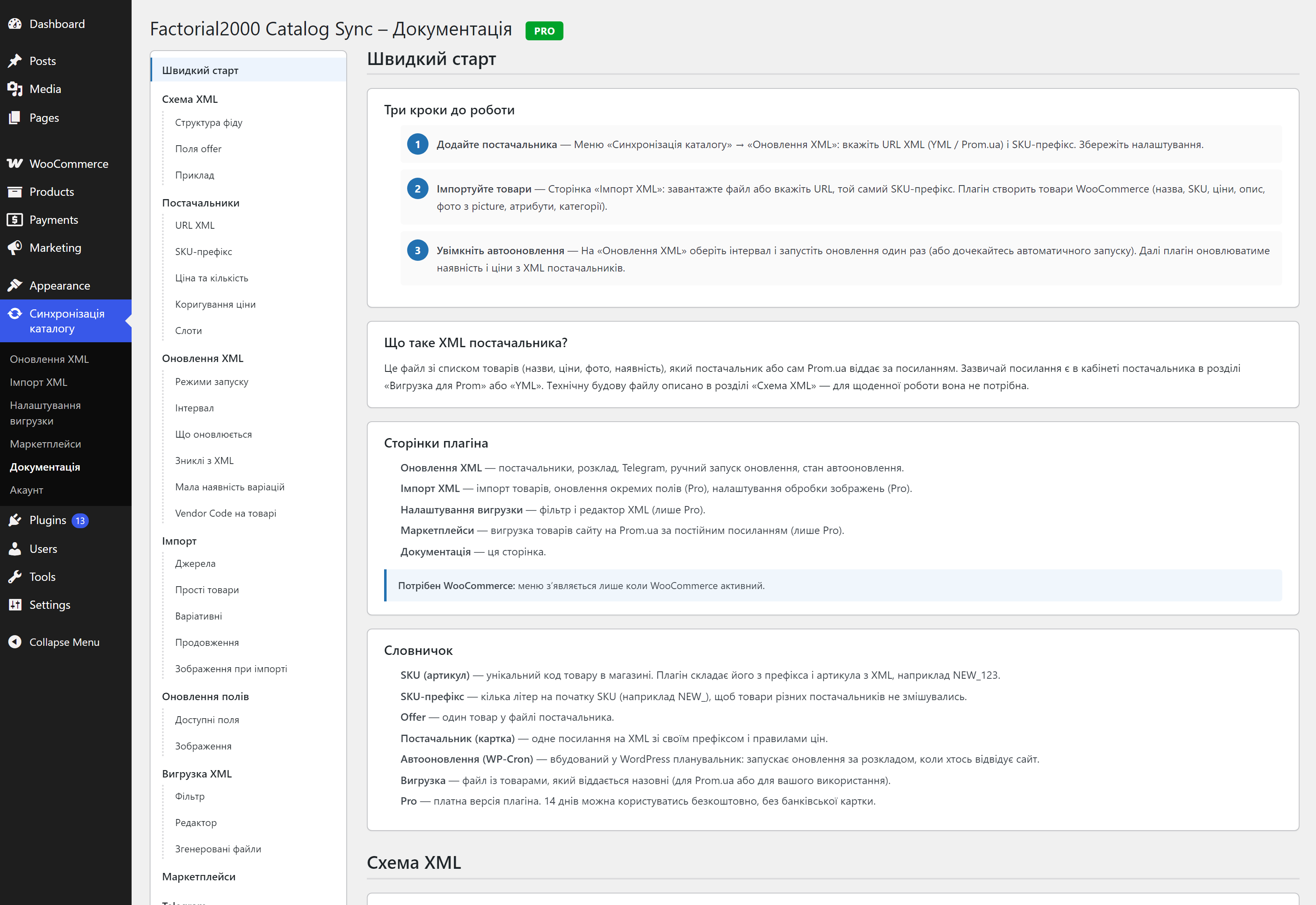
- Add the supplier XML link and a SKU prefix on Синхронізація каталогу Оновлення XML.
- Run the first import on Імпорт XML.
- Choose how often stock and prices update.
- (Pro) Open Маркетплейси, pick a Prom.ua preset, map your categories, and give Prom the feed link.
Requirements: WordPress 5.8+, WooCommerce 3.0+, PHP 7.4+ with the XML, SimpleXML and cURL extensions.
Video setup guide: YouTube tutorial
External services
This plugin connects to external services. All of them are optional and are used only when you configure them or opt in.
Supplier XML feeds (e.g. Prom.ua)
When you enter an XML feed URL in the settings, the plugin downloads that file during the initial import and during scheduled stock/price updates. Only a request to the URL you provide is made and no personal data is sent. The feed is provided by your supplier (for example Prom.ua); please refer to that provider’s own terms and privacy policy.
Telegram Bot API
If you enter a Telegram bot token and one or more chat IDs in the settings, the plugin sends notification messages to the Telegram Bot API (https://api.telegram.org) after an import or a stock/price update completes. The data sent includes your bot token, the target chat ID(s) and the text of the sync report (for example counts of updated or missing products). Requests are made only when Telegram notifications are configured and an update runs.
This service is provided by Telegram. Terms of Service: https://telegram.org/tos. Privacy Policy: https://telegram.org/privacy.
Freemius (licensing, trial and optional usage data)
The plugin includes the Freemius SDK, which provides the Pro trial, license activation and the account area. Nothing is sent until you opt in or start a trial or purchase from the plugin screens. After you opt in, the SDK sends the data Freemius describes: your site URL, WordPress/PHP and plugin versions, and the admin name and email address, so that your account, trial and license can be managed. You can skip the opt-in and keep using the Free features.
This service is provided by Freemius. Terms of Service: https://freemius.com/terms/. Privacy Policy: https://freemius.com/privacy/.
Screenshots
Installation
- Upload the plugin files to the
/wp-content/plugins/factorial2000-catalog-syncdirectory, or install the plugin through the WordPress plugins screen. - Activate the plugin through the Plugins screen in WordPress.
- Make sure WooCommerce is installed and active.
- Open Синхронізація каталогу Оновлення XML in the admin menu.
- Add your supplier XML URL, SKU prefix (e.g.
SUP_), and choose the update interval. - Go to Імпорт XML for the initial product import from your XML file.
- Optionally configure Telegram notifications on the Оновлення XML page.
- Refer to the Документація tab for full usage details.
To use Pro features (Prom.ua feed, several suppliers, XML editor, image processing), install the Pro build from your Freemius account; the plugin shows the link when you start a trial or buy a license.
FAQ
-
Як імпортувати товари з Prom.ua в WooCommerce безкоштовно?
-
Встановіть плагін, відкрийте «Синхронізація каталогу Імпорт XML», вставте посилання на XML/YML-вигрузку Prom.ua або постачальника і вкажіть SKU-префікс. Плагін створить прості та варіативні товари з фото, атрибутами й категоріями. Імпорт безкоштовний.
-
Як автоматично оновлювати ціни та залишки з XML постачальника?
-
На сторінці «Оновлення XML» додайте посилання на фід і оберіть інтервал. У безкоштовній версії оновлення йде щодня, у Pro — від кожних 5 хвилин. Можна задати націнку, маржу або фіксовану суму та отримувати звіти в Telegram.
-
How is it different from general-purpose importers?
-
It is built for one job: YML/Prom.ua feeds in WooCommerce. Scheduled stock and price sync and price adjustment are free, and the Pro build adds a ready Prom.ua feed. General-purpose importers let you map any file format yourself; this plugin has no custom field mapper and reads standard YML tags.
-
How do I sync supplier stock and prices with WooCommerce?
-
Add the supplier’s XML/YML link and a SKU prefix on the Оновлення XML page and choose an update interval. The plugin reads the feed on schedule and updates stock status and prices of the products that carry that prefix. The Free plan updates one supplier once a day; Pro supports several suppliers and intervals from every 5 minutes.
-
How do I import products from a Prom.ua or YML feed into WooCommerce?
-
Open Імпорт XML, paste the feed link (or choose a file), analyze it, and run the import. Simple products and variable products (offers grouped by
group_id) are supported, with images, attributes and categories. -
Can I export my WooCommerce products to Prom.ua?
-
Yes, in Pro. Open Синхронізація каталогу Маркетплейси, set up the Prom.ua feed and give Prom the feed URL shown on the page (Prom import from a link). The feed contains published products with a price, a picture and a category; out-of-stock products are listed with
available="false". It is built in the background and can be refreshed on a schedule and/or after every stock sync. The feed URL contains a secret token; anyone who knows it can read your product data, the same as Prom does. -
Which marketplaces are supported?
-
Prom.ua (Pro). The Marketplaces page is designed to hold more marketplaces; Rozetka and Hotline are planned and not available yet.
-
What is free and what is paid?
-
The plugin on WordPress.org is fully working and has no locked features: import, one-supplier scheduled sync, price adjustment, currency conversion, Telegram reports. Pro is a separate build with the marketplace feed, several suppliers, quantity updates, the XML editor, the fields updater and image processing. See “What you get for free” and “What Pro adds” above.
-
Is there a free Pro trial?
-
Yes: 14 days, no credit card. Install the Pro build from your Freemius account when the trial starts. After it ends, the Free plugin keeps working with its normal limits.
-
Does this plugin require WooCommerce?
-
Yes. It is built for WooCommerce product import and synchronization.
-
Which XML format is supported?
-
YML as used by Prom.ua and many Ukrainian suppliers, including simple
<offer>and variable products withgroup_id. See the built-in documentation for the field reference. -
What happens to products missing from the supplier feed?
-
If a SKU prefix is configured, products with that prefix that are no longer in the feed are handled: simple products go to Draft, variations are set out of stock. Products you drafted yourself are not touched. If the feed is broken or empty, the plugin does not trust it and sets that supplier’s products out of stock until a valid feed returns. Without a SKU prefix nothing is changed. Make sure your feed always contains the full catalog.
-
Yes. Feeds are read with a streaming XML parser, so a large file does not have to fit in memory. The stock and price sync works in batches of 100 products and stops before the PHP time limit; the import runs in small portions, so one request never has to process the whole catalog. Scheduled runs use WP-Cron. For large catalogs, or if your site has little traffic, add a real server cron that calls
wp-cron.php(the built-in documentation has a ready line) and use the background mode. -
Why is the first import with pictures slow?
-
WordPress has to download every picture from the supplier and create its thumbnail sizes, so the first import of a catalog with many photos takes time on any hosting. It runs in portions and can be repeated: products that already exist are skipped, so you can continue where it stopped. Later stock and price syncs do not download pictures.
-
Do I have to map the feed fields myself?
-
No, and there is no custom field mapper: the plugin reads the standard YML tags used by Prom.ua and most Ukrainian suppliers (see the field reference in the built-in documentation). If a supplier uses another structure, ask for their Prom.ua/YML export.
-
What happens if I rename or move categories in WooCommerce?
-
Stock and price sync never changes names, descriptions, pictures or categories of existing products. When you import new products, categories are matched by name and parent, so a category you renamed may be created again under the feed’s original name. Rename it in the feed or reassign the products after the import. In Pro, the fields updater can refresh categories of imported products.
-
In which language are the plugin screens and documentation?
-
Ukrainian.
-
Where can I report bugs or request features?
-
Please use the support tab on WordPress.org.
Reviews


Contributors & Developers
“Factorial2000 Catalog Sync for Prom.ua” is open source software. The following people have contributed to this plugin.
Contributors
Translate “Factorial2000 Catalog Sync for Prom.ua” into your language.
Interested in development?
Browse the code, check out the SVN repository, or subscribe to the development log by RSS.
Changelog
0.7.0
Important: Pro features are now shipped only in the Pro version of the plugin. If you have a Pro license or an active trial and update from WordPress.org, you get the Free version and the Pro features stop working until you install the Pro version from your Freemius account. The plugin shows a notice with the link.
New:
* Price adjustment per supplier (markup / margin / fixed amount) is now free.
* (Pro) Prom categories are picked by name: the Prom category list is built in, so the store-to-Prom table, the default category and the new «Prom.ua» box in the product editor search it and fill in the id. A category chosen on the product wins over the category rules (Prom ranks the offer’s portal_category_id first); variations use their product’s.
* Import option «Імпортувати тільки товари в наявності» (import in-stock products only): out-of-stock offers are skipped, a variable product gets only its in-stock variations, and a group with nothing in stock is skipped.
* (Pro) «Marketplaces» page: publish your WooCommerce products to Prom.ua as a feed at a permanent private link. Simple and variable products, brands and Prom categories are supported, and large catalogs work too. The feed is refreshed on a schedule or from the command line: wp f2000cs marketplace build prom.
* (Pro) Option «Після оновлення наявності» (after stock update): after every stock and price sync the Prom feed is rebuilt in the background and published at the same link, so Prom always gets current prices and stock.
* Products that the stock sync set to Draft because they disappeared from the supplier feed are published again when they return to the feed. Products you drafted yourself are never touched, and drafted products are no longer reported on every run.
* A notice with a link to the Freemius account when a Pro license or trial is active but the Free version is installed.
Improved:
* (Pro) Marketplaces settings are mostly one-click presets. Brand names and store-to-Prom category mapping use searchable tables instead of text fields.
* Ukrainian translation of the Freemius screens (about 440 more strings).
* The Import page no longer remembers the last XML URL: the URL field starts empty (the SKU prefix is still remembered).
* (Pro) Prom categories are chosen in a searchable Select2 field (type a name or the start of an id) with a link to Prom’s official category list with ids. The brand table lists the shop’s brands: fill «Brand in Prom» only where the name differs.
* (Pro) The Prom feed page shows why products were left out (no price, picture, category …) with example SKUs.
* (Pro) The Prom feed follows Prom’s import rules: the article (vendorCode) is cut to 25 allowed characters, the product code is sent as (Prom reads as an article), a name without letters is skipped, and the page warns about an unsupported currency and a file over 180 MB. It also explains that Prom takes prices and stock every 4 hours.
* (Pro) Product descriptions sent to Prom lose shortcodes and block editor comments; line breaks of classic descriptions are kept as paragraphs. Picture URLs with Cyrillic file names are encoded.
* (Pro) «Unpublished products» now also exports draft variations and no longer exports private products.
* A broken supplier feed no longer leaves stale stock on the site: if the XML is torn (fatal parse error) or has no offers, every product and variation with that supplier’s SKU prefix is set out of stock until a valid feed returns, and the Telegram message says why the feed failed. Without a SKU prefix nothing is touched, so the whole shop can never be hit.
* Long import and sync runs no longer flush the whole object cache — only the transients cache group is cleared — so the import session cache and other caches survive a run. Plugin temp files older than two hours are removed by a daily cron event and by an hourly admin sweep.
* With the Factorial2000 Translator active and both Russian and Ukrainian enabled, the Prom feed sends the Russian text in / and the Ukrainian one in / (a missing Russian translation falls back to the site language); language tags never leak into the feed.
Fixed:
* After switching from Free to Pro the scheduled stock sync stopped until the next manual run. The schedule is now restored on activation and follows the real interval when a trial starts or ends.
* A marketplace feed is no longer left frozen when Pro is not active: the published file is withdrawn once it is more than 3 days old. Deactivation stops marketplace schedules; uninstall removes marketplace settings, feed files and temporary import data.
* wp f2000cs marketplace build now requires an active Pro license or trial.
* Price adjustment (markup / margin / fixed amount) is now available in the Free version, so a saved rule keeps working when Pro is not installed. With a license or trial but without the Pro version installed, stock statuses of products with managed quantity are left alone when quantity updates were saved before; install the Pro version to resume them.
* Switching between Free and Pro no longer starts a full stock sync right away, and saving the settings on the Free version no longer overwrites the saved update interval.
* The «Pro version missing» notice is shown on every admin screen and also when Pro settings are saved without a license.
* (Pro) A Prom feed that suddenly has less than half the products of the last published one is held back (a broken supplier feed can no longer empty the catalog on Prom); a button publishes it when the shrink is expected.
* (Pro) If the built Prom feed cannot replace the published file, the job now reports an error instead of «done», and the previous feed stays at the same link.
* (Pro) A stock sync during a long feed build no longer restarts it; one more build runs when it finishes. Products drafted during a build are no longer skipped, and two builds can no longer run at once.
* (Pro) Prom category rules match the start of the category path: «Одяг» no longer catches «Дитячий одяг».
* (Pro) A variation without a size is no longer given a guessed size unless only one size is left for it.
* Products that 0.6.x set to Draft are not published again automatically: only products drafted by 0.7.0 or later are.
* A trial started on the Free version no longer shows a «full Pro access» countdown; it explains that the Pro version has to be installed.
* Activating Free and Pro versions together no longer mixes up which copy is premium.
* A URL import could leave hundreds of leftover files in the system temp folder: the feed cache lived in a transient that the plugin’s own cache cleanup dropped mid-import, so every batch request downloaded the feed into a new temp file. The cached download now uses a deterministic per-session file and is reused while it exists; uninstall removes these files too.
Security:
* Attribute names and server messages from a supplier feed are shown as plain text on the import analysis screen.
For developers:
* A free-vs-Pro build simulation now runs in CI so that Pro code can never leak into the Free build.
* Import session keys are lowercase, consistent with how they are read.
0.6.14
- Added: Pro option on the Import page — «Import stock quantity from XML». Reads
<quantity>,<stock_quantity>or<qty_stock>(decimal values such as1.000are supported) and enables stock management for simple products and variations. Off by default. - Added:
<qty_stock>(OneBox) is now recognized by the scheduled stock sync and the fields updater, not only by import. - Fixed: offers with an empty
available=""attribute (OneBox) were treated as in stock — they are now out of stock. If the attribute is missing entirely, the quantity decides (above 0 = in stock), otherwise the offer stays in stock. - Fixed: variations that share the parent’s first picture no longer download the same image again for every size (faster imports, no duplicate media files).
- Changed: stock quantity is no longer imported unconditionally (0.6.11 behavior) — it follows the new import option.
- Improved: documentation updated for qty_stock, available handling, quantity import, «Новинки» subcategories and the new update intervals; the XML editor treats
available="y"as in stock.
0.6.13
- Added: option to add product categories from the XML feed as subcategories under “Новинки” (instead of creating separate category trees) — improves organization for feeds with many categories.
- Improved: import checkpoint now includes the new
new_category_subcatsoption for seamless resume of imports with category nesting enabled.
0.6.12
- Fixed: the XML editor (Pro) failed to list any products after selecting a category — the session token generated on load could contain uppercase letters, which was silently lowercased on every later request, breaking the lookup on case-sensitive (Linux) hosting.
0.6.11
- Added: three new update intervals for Pro — 4, 6 and 8 times a day.
- Fixed: stock quantity from XML (
<quantity>or<stock_quantity>) is now properly extracted and imported during product import (both simple and variable products/variations). - Fixed:
_manage_stockis now automatically enabled when quantity is available from XML during import (previously always set to ‘no’). - Improved: stock quantity handling is now consistent across import, field updates, and scheduled stock sync operations.
0.6.10
- Fixed: the Freemius setup wizard now appears after activation, so new users can opt in and start the 14-day Pro trial (SDK was initialized too late to register its activation hook).
- Improved: compatibility verified with WordPress 7.0.4.
0.6.9
- Fixed: a resumed import can now be stopped — the stop button stays active during resume and shows «stopped» instead of a fake 100% completion.
- Fixed: generated XML download links could die with «link expired» — downloads now use a server-side token instead of a nonce, and the button label no longer repeats the long filename.
- Fixed: stock quantity updates no longer revert stock status and prices written by the same sync run (Pro).
- Fixed: batch processing now respects the raised execution-time limit, so large catalogs keep making progress on shared hosting.
- Fixed: aggressive transient cleanup no longer deletes transients belonging to other plugins.
- Fixed: temporary currency files are removed on all exit paths (no temp-file leaks).
- Fixed: per-product update failures are now logged instead of being silently swallowed (capped at 10 lines per run to protect the log).
- Fixed: field updates (title, description, short description) now report and log failures instead of silently claiming success.
- Fixed: leftover temporary files are removed after image conversion, and the export page now checks admin capabilities explicitly.
- Improved: image processing settings default to «Не конвертувати» and their tooltips explain that processing loads the server and can slow the import down.
- Security: SSL/TLS certificate verification is now enabled for feed and image downloads by default; a new «Weak SSL certificates» setting (Update page) lets you opt out for suppliers with self-signed or expired certificates, as does the
f2000cs_ssl_verifyfilter. - Security: XML feeds are parsed with network entity loading disabled (XXE hardening) and feed content (titles/descriptions) is sanitized before it is stored.
0.6.8
- Fixed: GIF and BMP are not converted or re-encoded on import (GIF animation preserved). Conversion applies to PNG, JPG, WebP, and AVIF only.
0.6.7
- Added: image conversion now covers ALL source formats (PNG, JPG, WebP, AVIF, GIF) — not just PNG — with same-format and SVG passthrough. UI label shortened to «Формат зображень».
- Added: Free plan now allows 3 manual stock updates per day (was 1).
- Fixed: the scheduled cron no longer consumes or is blocked by the Free manual-update quota.
- Fixed: Freemius
is_premiumflag set to false for the wp.org build so the 14-day trial offer works on manual installs.
0.6.6
- Added: PNG AVIF conversion on import (Pro), with host capability check.
- Improved: the Import page remembers the last XML URL and SKU prefix per admin.
- Fixed: Freemius 14-day Pro trial starts without a credit card.
0.6.5
- Improved: wordpress.org short description trimmed to the 150-character limit.
0.6.4
- Improved: Freemius free license activation UX and Ukrainian opt-in strings.
0.6.3
- Fixed: Freemius plugin-scope API paths (avoid duplicated /plugins/{id}/ prefix).
0.6.2
- Fixed: Freemius deploy uses plugin-scope API keys (Product Settings Keys).
0.6.1
- Fixed: Freemius GitHub deploy now fails loudly on API errors (custom deploy script).
0.6.0
- Added: Freemius freemium packaging with GitHub Actions deploy on
v*tags. - Fixed: removed
uninstall.php— cleanup runs on Freemiusafter_uninstall. - Improved: import progress UI and admin assets cache-busting.
0.5.9
- Fixed: removed
uninstall.phpfor Freemius deployment — cleanup now runs on Freemiusafter_uninstall.
0.5.8
- Fixed: import progress panel styles now load after CSS updates (asset version bump + reliable show/hide without stale browser cache).
- Improved: progress panel visibility is driven by
.is-activeand fully clears the HTMLhiddenattribute.
0.5.7
- Fixed: XML export filter now reads the SKU prefix from the correct slot-1 option (
f2000cs_sku_prefix_1) instead of the legacy key. - Fixed: XML Editor and export filter parse XML elements and attributes case-insensitively (
categoryId/CATEGORYID/parentIDetc.). - Fixed: numeric XML category/offer IDs round-trip as strings so the JS tree and product selection work correctly.
- Fixed: export page shows the correct product count and pre-fills the right prefix.
- Fixed:
<offer available>now correctly handles values1,yes,y,True,TRUEin addition totrue(YML spec compliance). - Fixed:
<currencyId>and<currencies>are now parsed — offer prices are converted using the currency rate when the offer currency differs from the store’s default. - Fixed:
<price>with European comma-as-decimal formatting (e.g. “1.999,00”) is now parsed correctly. - Fixed: multiple
<categoryId>elements per offer are now supported (comma-joined). - Fixed:
<param>elements with the samenameare now concatenated with “; ” instead of overwriting. - Fixed:
<param unit="kg">is now appended to the attribute value (e.g. “5 кг”). - Fixed:
download_url()calls now disable SSL verification, allowing image downloads from servers with self-signed certificates. - Fixed:
wc_product_meta_lookupprice columns are now synced after stock update price changes (HPOS compatibility). - Added:
<weight>,<barcode>,<dimensions>are now imported as product meta (_weight,_barcode,_dimensions). - Added: cron intervals
10_minute,15_minute,30_minutefor finer scheduling granularity (Pro). - Added: Documentation admin page with sticky sidebar navigation covering the full plugin functionality.
- Added: unit test harness with WP-function stubs (200+ tests, runs offline without WordPress/WooCommerce).
- Added: Gulp build system — interactive menu, SVN-ready release packaging, version bumping across all files, phpcs/phpunit runs.
- Added: PHPCS ruleset (WordPress standard) with project-specific cosmetic-sniff disables.
0.5
- Added: XML Editor — build a filtered export by selecting categories and/or individual offers, with conditions (only in stock, min/max price, keep oldprice) and live product thumbnails. Accessible from Налаштування вигрузки.
- Added: Image processing (Pro) — convert PNG to WebP/JPG, optimize, and resize product images on import.
- Added: Fields Updater — update selected fields (name, description, price, images, etc.) of products that are already on the site, matched by SKU.
- Added: case-insensitive parsing of XML feeds that use non-standard element casing.
- Added: modular admin pages split from the monolithic settings page.
- Improved: admin UI with collapsible category tree, search, and clearer supplier management.
- Improved: background sync event handling and transient cleanup.
0.4
- Replaced the simple per-supplier margin (%) field with a price adjustment switcher: choose between Маржа (margin, always added, 0-99%), Націнка (markup %, can be added or subtracted) or Фіксована сума (a flat currency amount, can be added or subtracted). Available when price updates are allowed for that supplier.
0.3
- First release on WordPress.org.
- Renamed functions, options, hooks, and assets to the f2000cs_ prefix for consistency.
- Bumped version and aligned plugin branding for the directory listing.
0.2
- Prepared the plugin for the WordPress.org directory: code now follows WordPress coding and security standards.
- Security: added nonce verification, capability checks, input sanitization and output escaping across all admin actions.
- All remote requests now use the WordPress HTTP API (wp_remote_get/wp_remote_post) instead of cURL and file_get_contents.
- Added a unique prefix and namespace to all functions, classes, options, hooks and meta keys to avoid conflicts with other plugins.
- Added a “Telegram notifications” setup guide and clearer field hints (how to get the bot token and chat ID).
- Documented external services (Telegram Bot API and supplier XML feeds) in the readme.
- Renamed the plugin to “Factorial2000 Catalog Sync for Prom.ua and WooCommerce” and changed the admin menu label to “Catalog Sync”.
- Added a WooCommerce activation check with an admin notice when WooCommerce is missing.
0.1
- Initial version: import of simple and variable products from Prom.ua XML, scheduled stock/price updates, XML export filter and Telegram notifications.